
| |||||||
|
 |
|
|||||
| |||||||
|
|||||||
| |||||||
| |||||||
| |||||||
|
Prevent Authors is WordPress Plugin that prevents authors from deleting and editing their posts if they are older than XX days (set in admin area). Installation: upload prevent-authors.php to your WordPress server in the wp-content/plugins/ directory. Open admin panel of your WordPress server via your browser. Go to the Plugins section and click to Activate Prevent Authors plugin. Settings: You can go to the Options section and
choose the Prevent Authors submenu item and adjust the plugin settings. 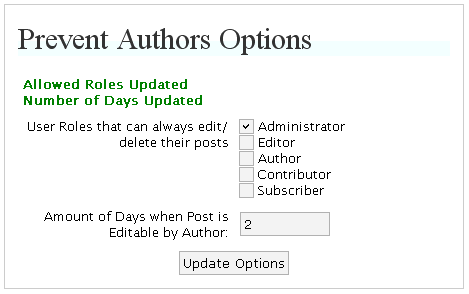 There you may set some User Roles that can always edit/delete their posts and define Amount of Days when Post Edit by Author is allowed. How it works: Having adjusted settings you can observe the influence of Prevent Authors Plugin. If someone whose role is not checked in settings as "always allow edit" tries to edit or delete the own post later than XX days (also set in options) after it was created, WordPress will alert "Sorry, this post is too old to be edited". Notes: Currently plugin does not work properly when using XMLRPC WordPress functions. ToDo: add XMLRPC support. More features: please contact us if you need more advanced Prevent Authors script.
|
|
 TheRedirector Pluginver 1.0.2 WordPress plugin that replaces external links inside posts and comments, and keeps track of links that have been clicked. Allows blog owner to specify which links must stay external. The easiest way to hide external links on wordpress blog. More details »
October 2009
New product: TheRedirector Plugin »»»
July 2008
Article Import Plugin ver 1.19 »»»
June 2008
Article Import Plugin ver 1.18 »»»
|
|
|||||||||||||||||||||||||||||
| |||||||||||||||||||||||||||||||||
|
|
|
|
||
| ||







